How to Help Users Reset Their Password?
Last updated: May 7, 2026
Overview
When users report that they can't reset their password or aren't receiving password reset emails, the issue is usually related to how their account was originally created. The key to resolving these issues is understanding the difference between phone-authenticated accounts, Google Sign-in accounts, and email-authenticated accounts.
Primary Causes: Phone-Authenticated and Google Sign-in Accounts
The most common reasons users can't reset their password are:
Phone-only accounts - Cannot reset passwords because they don't have one
Google Sign-in accounts - Cannot reset passwords and require support intervention
These accounts bypass the traditional email and password login method entirely, so there's nothing to "reset."
Why These Accounts Can't Reset Passwords
Account Type | Can Reset? | Why Not? |
|---|---|---|
❌ Phone-only accounts | No | No associated password exists |
❌ Google Sign-in accounts | No | Authentication handled by Google only |
✅ Email-authenticated accounts | Yes | Has password created during signup |
Identifying the Account Authentication Type
Before helping a user, you must determine which authentication type their account uses.
Check the Account Profile
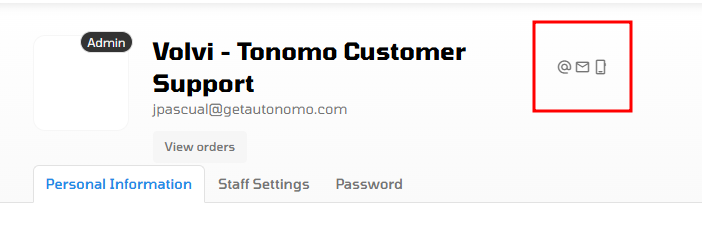
In the customer's profile, look for a visible icon on the right side of their name:
☎ Phone Logo = Account created using phone number only
🔵 Google Logo (Mail) = Account created using Google Sign-in
@ Symbol = Account created using email and password
This icon immediately tells you which authentication method is in use.
Solution by Account Type
For Phone-Authenticated Accounts
Users with phone-only accounts must register a password first before they can use password reset functionality.
How Users Can Register a Password
Go to the login page
Enter their Tonomo portal account email address
Enter their desired password
Click "Register with email"
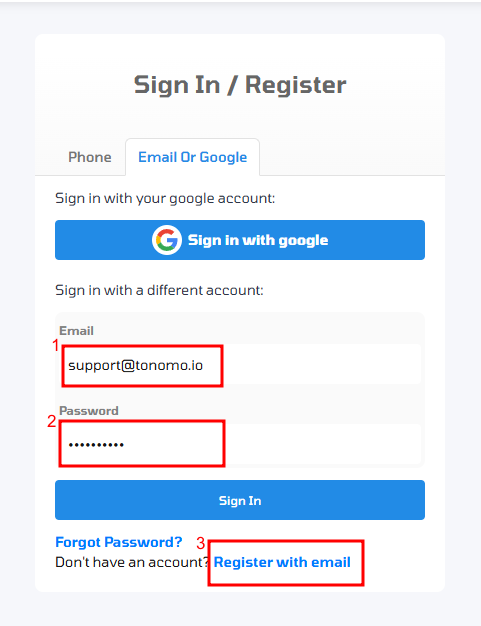
This is a registration process, not a password reset. Users are creating password login capability for the first time.
After Password Registration
Once a password has been registered, users can:
✅ Use standard password reset functionality
✅ Reset their password whenever needed
✅ Receive password reset emails
For Google Sign-in Accounts
Google Sign-in accounts require special handling and cannot be self-service reset.
What Admins Should Do
Contact Tonomo Support Team directly
Provide the account name, email, or phone number
Wait for Tonomo Support Team to generate a temporary login
What Tonomo Support Team Will Do
The Tonomo Support Team will:
Create a temporary login credential for the user
Send the temporary login to the Admin
User logs in with temporary credentials
Password reset functionality becomes available after first login
This is the only way to enable password reset for Google Sign-in accounts.
For Email-Authenticated Accounts
Users with email-authenticated accounts can use standard password reset immediately.
How Users Can Reset Their Password
Go to the login page
Click "Forgot password?"
Enter their email address
Check email for password reset link (check spam folder if needed)
Click the link and create a new password
Key Distinctions to Remember
These are commonly misunderstood, so clarify them when helping users:
Password Registration vs. Password Reset
Password Registration = Creating password login capability for the first time (phone-only accounts only)
Password Reset = Changing an existing password after it's already been registered
Authentication Type Capabilities
Phone-Authenticated Accounts (☎):
❌ Cannot receive password reset emails initially
❌ Don't have a password to reset initially
✅ Can register a password at any time
✅ Can then use standard password reset
Google Sign-in Accounts (🔵):
❌ Cannot receive password reset emails
❌ Don't have a password to reset initially
❌ Cannot self-service reset password
✅ Must contact Tonomo Support for temporary login
✅ Can reset password after Tonomo Support intervention
Email-Authenticated Accounts (@):
✅ Can use password reset immediately
✅ Can reset password without restrictions
✅ Receive password reset emails directly
Troubleshooting Checklist
When a user can't reset their password:
[ ] Check the account profile icon to identify authentication type
[ ] If ☎ phone-only → Direct them to register a password first
[ ] If 🔵 Google Sign-in → Direct them to contact Tonomo Support Team
[ ] If @ email-authenticated → Use standard password reset
[ ] Have them check spam/junk folders for password reset emails
[ ] Confirm the email address they're using is correct
[ ] If still having issues, escalate to Tonomo Support Team
Summary
The most important thing to know:
☎ Phone-authenticated users cannot reset passwords because they don't have one. They must register a password first using their email address.
🔵 Google Sign-in users cannot reset passwords because Google handles their authentication. They must contact Tonomo Support to receive a temporary login.
@ Email-authenticated users can use standard password reset immediately.
This distinction between account types is critical to solving password-related issues quickly and directing users to the appropriate solution.