Export and Import Users
Last updated: June 4, 2026
Export Users
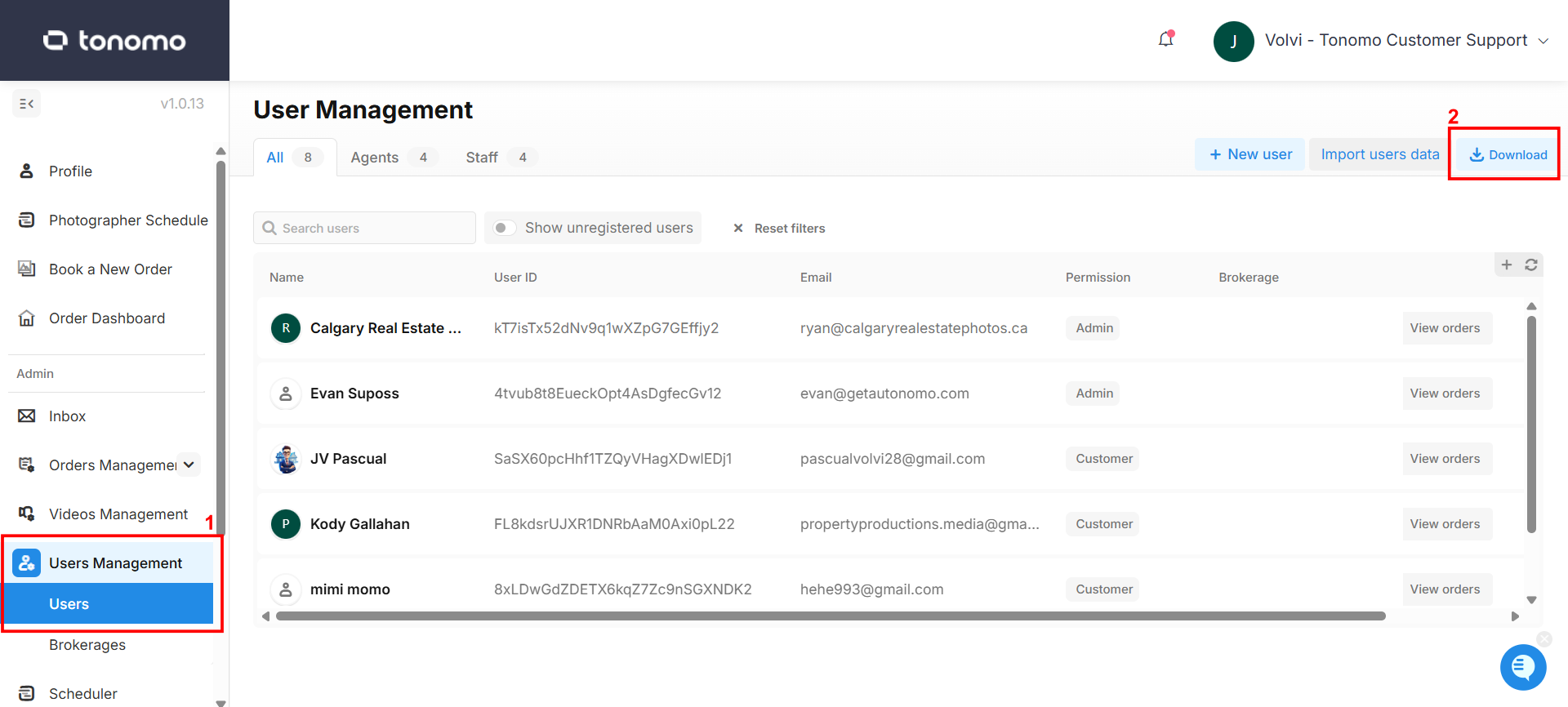
To export your customer list, go to User Management > Users, then click the Download button located at the top right corner of your screen.
Import Users
To import your customer list, follow these steps:
Navigate to Users Management > Users.
Click on "Import users data."
Ensure the imported data adheres to the following format:
Include Header: Please include the header when importing your Excel file.
Save as CSV: Save the Excel file as a CSV before importing.
Blank Data: If customer data is blank, leave it as is during the import process.
Phone Numbers: Ensure that phone numbers start with the country code.
Here is the link to the template you can use: Customer List Import Template.
Fill out as many details as possible in the template. The client name is required. While phone numbers are not strictly required, including them is strongly recommended to prevent duplicate client issues in the future.
Email Field: The email field is optional and can be added later if not available during import.
Phone Numbers: Ensure that phone numbers start with the country code.
We strongly recommend sending your CSV file to Tonomo Customer Support. Our team will take care of formatting and importing your users to ensure everything is set up correctly.